Darktide Hack with Aimbot, ESP and Auto Melee Cheat for PC

Included in Premium Package and One Day Trial

Steam & Microsoft Store are supported
Cheat video
Cheat video
Cheat video
Cheat video
Cheat video
Darktide Aimbot
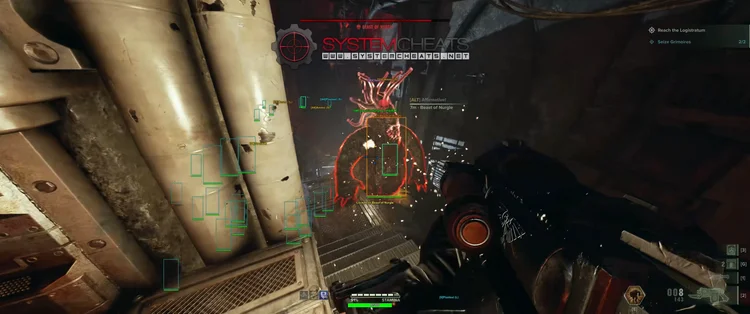
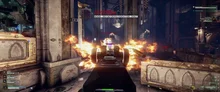
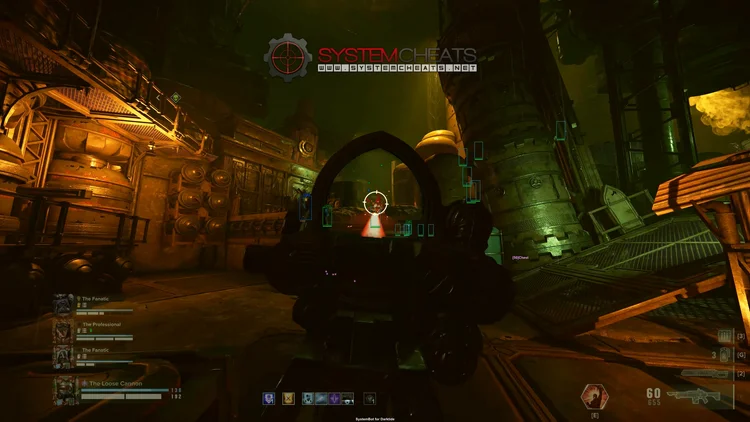
Darktide Screenshot 2
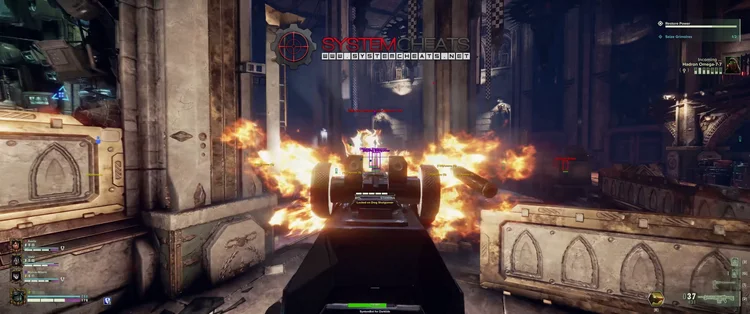
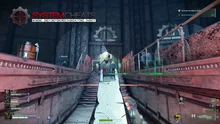
Darktide Screenshot 3
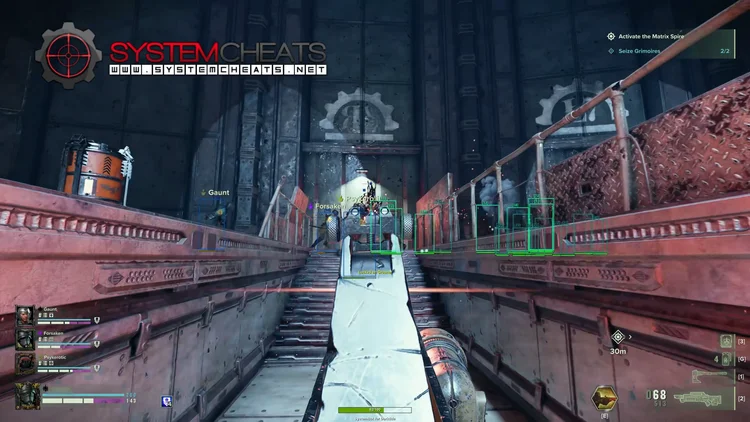
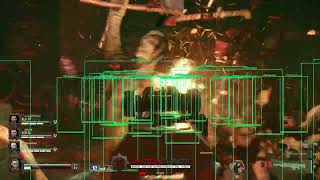
Darktide Screenshot 4
Co-op horde shooter • Aimbot, ESP and Auto Melee • Steam and Microsoft Store

Darktide Hack with Aimbot and ESP for PC

Get instant access to the Darktide Cheat for PC.

Warhammer 40,000: Darktide is a four player co-op first-person action shooter from Fatshark, the team behind the Vermintide series. It is set in the Hive City of Tertium on the industrial planet Atoma Prime, deep in the Warhammer 40,000 universe. You and three other players fight through hordes of AI enemies with a mix of melee and ranged weapons, then head back to the Mourningstar to gear up for the next mission.

You pick a class and build your own character. The Veteran, Zealot, Ogryn and Psyker are the base classes, and the paid classes add the Arbites, the Hive Scum and the Skitarii. All classes have toughness, a shield that regenerates. Missions run from Uprising and Malice up to Heresy, Damnation and Auric, and the harder the difficulty, the more enemies come and the harder they hit. Next to the standard missions you find Havoc, the Mortis Trials, Special Assignments and the Expeditions mode outside the hive.

Progress in Darktide leans on random rewards, currencies and crafting, so a failed run costs real time. Our Darktide hack is built for the fights that end runs: an aimbot and triggerbot that know what to leave alone, 3D ESP for elites and specials, item ESP for supplies and collectibles, and Auto Melee, Auto Block and Auto Dodge for the moments the horde reaches you.

Tactical upgrade briefing
Built for the horde and the elites

Darktide is a game of priorities. The Darktide cheat marks elites and specials through walls, aims at the targets you choose, skips the Daemonhost you do not want to wake, and shows ammo, med stations and collectibles in the world around you. All of it is set in the in-game menu and saved to your own settings slots.

Darktide Hack and Cheat Features

The Darktide cheat covers aim, melee, awareness and loot. The aimbot, the triggerbot and both radars have their own switches for normal enemies, elites and specials, and four settings slots with their own hotkeys keep different setups ready. The highlights are below, and the full option list is in the Features panel on this page.

  • Aimbot with Bullet PredictionAuto Aim and Auto Fire with Smooth Aim, Limit Angle and an aim key. Bullet Speed Prediction, Bullet Drop Prediction and Prediction Scale help shots land on moving and distant targets. Aim Bone picks Head, Neck or Chest, and Aim Style picks targets by FOV, Distance, Health, Smart FOV or Smart Distance.
  • TriggerbotFires when your crosshair is on a valid target. Choose AI, elites or specials, set a Fire Delay, cap the Max Distance and run it on its own trigger key. It has its own Ignore Daemonhost, Ignore Crusher and Ignore Bulwark Shield options, just like the aimbot.
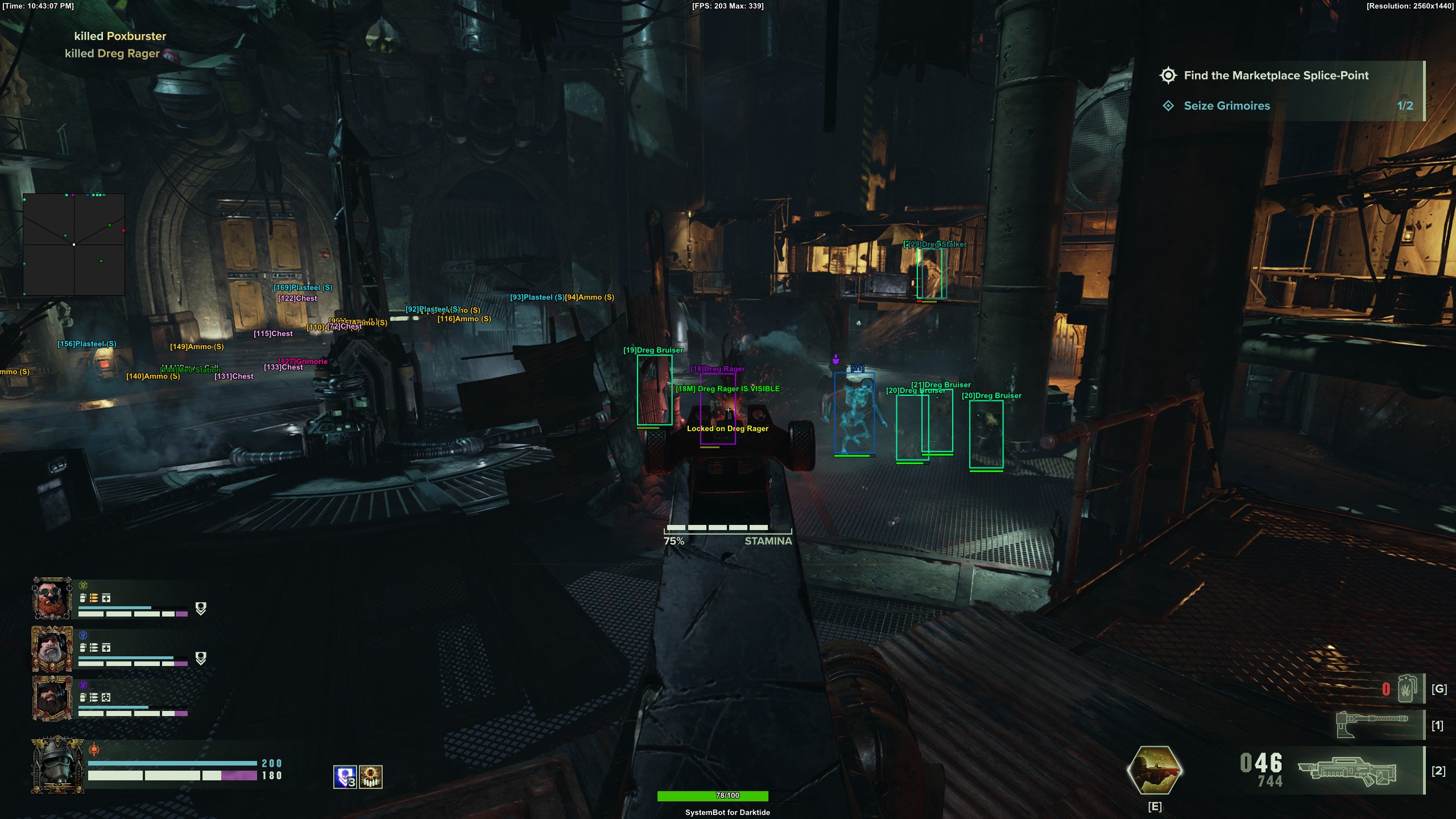
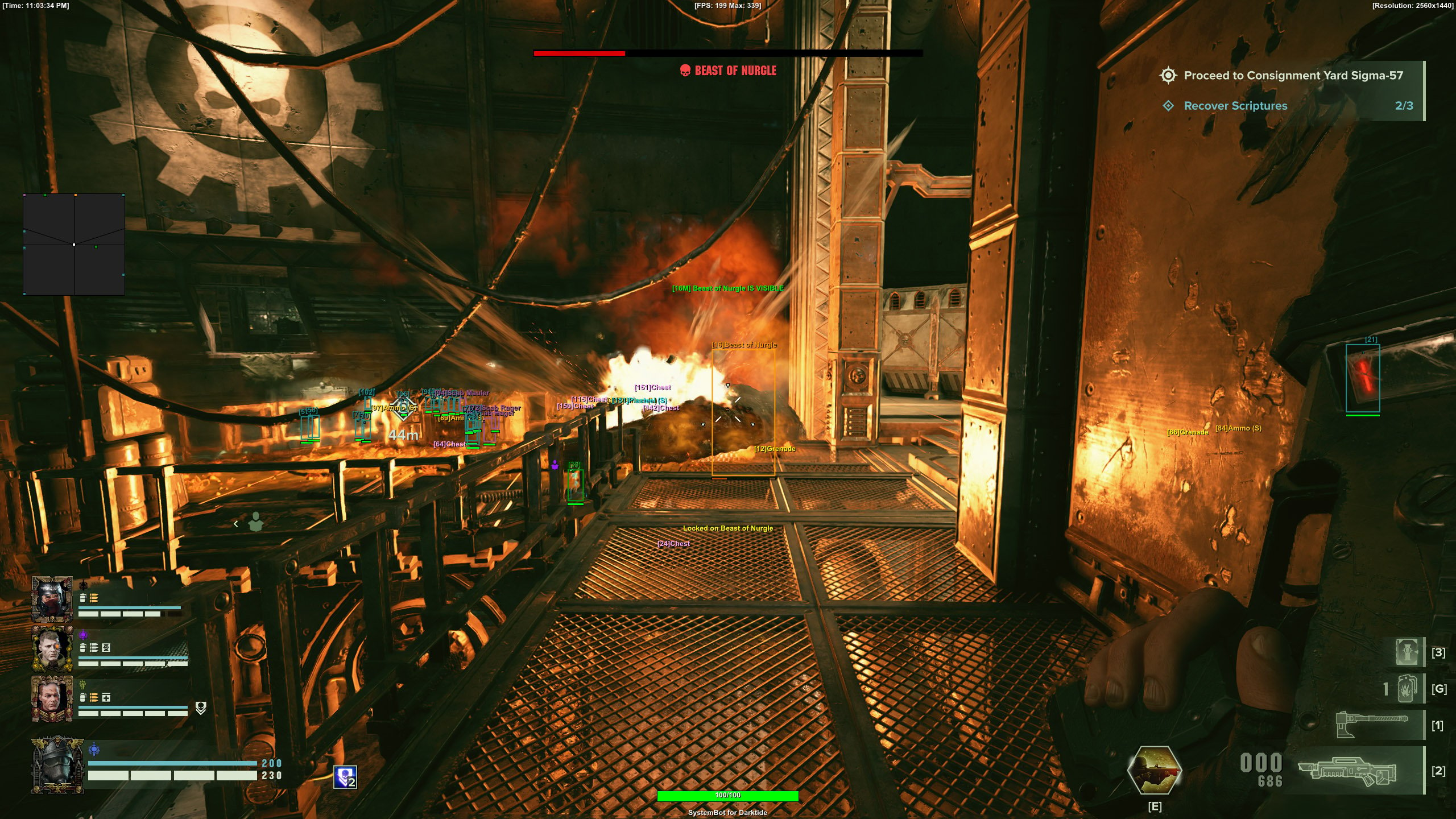
  • 3D Radar ESPBounding Box in 2D or 3D, Head Dot, 2D Line and Aim Laser. Name, distance and health ESP for AI, elites and specials, each with its own visible and invisible colour, plus Show Invisible for enemies behind cover.
  • Item and Collectible ESPAmmo ESP, Med Station ESP, Chest ESP, Material ESP, Misc Item ESP and Grenade ESP. Collectible ESP shows Scriptures and Grimoires. Max Item Distance, Item Distance ESP, an Include or Exclude Filter and 20 Item Filters keep the screen clean.
  • Auto Melee, Block and DodgeAuto Melee with Auto, FOV and Manual Aim modes and its own Auto Melee Distance and melee key. Auto Block and Auto Dodge sit in the Misc menu next to Auto Ping.
  • 2D Radar and Warning SystemA top-down radar with Radar Scale, Window Size, Stick To Window and Center 2D Radar. The Warning System shows when an enemy is aiming at you or can see you, each with its own angle, plus a Beep System.
  • Recoil, Control and SettingsCompensate Recoil, Compensate Sway and Compensate Spread for steadier guns. A custom crosshair (Cross, Dot or T-Cross), health bars, a Panic Key, and a default plus three custom settings slots, each with its own hotkey.
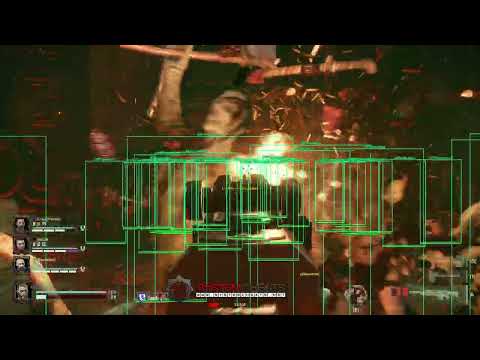
Darktide Hack in-game screenshot 1 of 4 Darktide Hack in-game screenshot 2 of 4 Darktide Hack in-game screenshot 3 of 4 Darktide Hack in-game screenshot 4 of 4

Darktide Aimbot Against Crushers, Bulwarks and Reapers

Armoured enemies are a well known pain point in Darktide. Ogryn Crushers, Bulwarks and Reapers can fill a corridor. The Darktide aimbot lets you decide where the shots go. Aim Bone picks Head, Neck or Chest, and Aim on Elite and Aim on Special put the aim on the enemies that matter. Ignore Crusher and Ignore Bulwark Shield tell the aimbot and the triggerbot what to leave alone, so your ammo goes where you want it.

Darktide Triggerbot and the Daemonhost

Darktide players learn one rule fast: do not wake the Daemonhost. A dormant Daemonhost can be woken up, and a Daemonhost can grab a player. An aimbot or triggerbot that fires at anything in range is a problem next to one. That is why the aimbot and the triggerbot both have Ignore Daemonhost. With it on, the aimbot and the triggerbot leave the Daemonhost alone and the choice to fight it stays with your team.

Darktide ESP for Specials and Elites

The enemies that end runs are rarely the ones in front of you. The elite Scab Plasma Gunner hits hard from range, the Ogryn Pack Master hits with a shock prod that raises your Stamina cost and slows Stamina regeneration, and a Poxburster explosion hurts everyone close by. The Darktide ESP shows Special Name ESP, Special Distance ESP and Special Health ESP, with the same three for elites, and AI Name, Distance and Health ESP cover every other enemy.

Separate visible and invisible colours for elites and specials tell you at a glance who is in the open and who is behind a wall, like a wallhack for the enemies that matter. Aim Style Smart FOV or Health helps the aimbot choose, and Draw Locked shows which target it is on.

Auto Melee, Auto Block and Auto Dodge for the Horde

Darktide is as much a melee game as a shooter. Scabs and Dregs rush in large groups, and a missed block can cost you your toughness and then your health. Auto Melee has three modes, Auto, FOV and Manual Aim, with an Auto Melee Distance and its own melee key. Auto Block and Auto Dodge help when the horde surrounds you, so you can keep your eyes on the specials instead of your guard.

Darktide Item ESP for Missions and Expeditions

Supplies decide how long a run lasts. In Expeditions you play against the clock in open Scavenge Zones outside the hive, and corruption builds once the timer runs out. A minute spent searching corners is a minute lost. Darktide item ESP covers Ammo ESP, Med Station ESP, Chest ESP, Material ESP and Misc Item ESP around you, with Item Distance ESP and a Max Item Distance so far items stay off the screen. Collectible ESP shows where Scriptures and Grimoires are. The Include or Exclude Filter, 20 Item Filters and an item key let you show only what you are looking for.

Steady Guns With Compensate Recoil and Prediction

The ranged side of Darktide runs from the Veteran, the class built as a sharpshooter, to the Skitarii with the Arc Rifle, the Galvanic Rifle and the Phosphor Blast Pistol. Heavy weapons kick, and moving targets are hard to hit at range. Compensate Recoil, Compensate Sway and Compensate Spread keep your gun steadier, and the aimbot uses Bullet Speed Prediction, Bullet Drop Prediction and Prediction Scale to place the shot where the target will be.

Warning System and 2D Radar for Gunners and Snipers

Gunners and snipers can pin a team down before anyone sees them. The Warning System shows a warning when an enemy is aiming at you or can see you, each with its own angle and a Max Distance, and the Beep System adds a sound alert. The 2D Radar shows AI, elites and specials on a small window you can place with the mouse, and Show Invisible adds the enemies you cannot see from where you stand.

How to Use the Darktide Cheat

Setting up your Darktide hack takes three steps.

01
Create Your Account

Register on the forum, choose a Darktide subscription or the Premium Package, and download our loader.

02
Load and Launch

Run the loader as administrator, select Warhammer 40,000: Darktide and start the game. Open the cheat menu with your menu key.

03
Tune and Save

Set up aim, ESP and melee the way you like and save them to the default slot or one of three custom slots, each with its own hotkey.

Is It Safe to Cheat in Darktide?

The Darktide EULA and the Steam store page do not name an anti-cheat product. The EULA says Fatshark games may have built-in Cheat Detection Software that can collect data about unauthorized programs or processes, and that cheating in one Fatshark game can end your license for all Fatshark games.

Fatshark’s modding policy also warns that mods which affect other players can lead to a warning and a possible ban. No cheat is ever completely risk free. Smooth Aim, Randomize Aim, Use Aim Key and the Panic Key keep you in control of how the cheat behaves. The live cheat status page always shows the current state of every cheat, so check it before you play.

Frequently Asked Questions

Is the Darktide cheat online?

The live cheat status page always shows the current state of every cheat, including Darktide. Check it before you buy and before you play.

Is Darktide included in the Premium Package?

Yes. You can buy the Darktide cheat as a single cheat, and it is also included in the Premium Package. The price box on this page shows both options.

Which versions of Darktide does the cheat support?

The cheat is built for Warhammer 40,000: Darktide on Windows 10 and 11 PC. Both the Steam and the Microsoft Store versions of the game are supported.

Which anti-cheat does Darktide use?

The Darktide EULA and the Steam store page do not name an anti-cheat product. The EULA says Fatshark games may have built-in Cheat Detection Software.

Can the aimbot leave the Daemonhost alone?

Yes. The aimbot and the triggerbot both have Ignore Daemonhost, plus Ignore Crusher and Ignore Bulwark Shield.

Does the cheat show Scriptures and Grimoires?

Yes. Collectible ESP shows where Scriptures and Grimoires are, with its own colour and the Max Item Distance setting.

Does the Darktide cheat help in melee?

Yes. Auto Melee handles close fights in three modes, and the Misc menu adds Auto Block and Auto Dodge.

Take Back Tertium With the Darktide Cheat

Darktide rewards teams that spot the right enemy first and keep their supplies up. With aimbot, ESP, item ESP and Auto Melee in one menu, you spend less time searching and more time finishing missions. Grab the Darktide cheat on its own or as part of the Premium Package.

Need Help?

Our support team is available 24 hours a day, 7 days a week through the SystemCheats forum and TeamSpeak. Read what customers say on Trustpilot, or compare all cheat packages to find the right fit.

Cheat & Hack Information

What is Darktide?


Warhammer 40,000: Darktide is a four player co-op first person action shooter from Fatshark. You and three other players fight hordes of AI enemies in the Hive City of Tertium with melee and ranged weapons, as classes such as the Veteran, Zealot, Ogryn and Psyker.


Cheating in Darktide


The Darktide cheat has an aimbot and triggerbot with Ignore Daemonhost, 3D ESP for elites and specials, item ESP for supplies and collectibles, Auto Melee, Auto Block and Auto Dodge. It is sold as a single cheat and in the Premium Package.


Is the Darktide cheat safe?


The Darktide EULA and Steam page do not name an anti-cheat product, but the EULA says Fatshark games may have built-in Cheat Detection Software. No cheat is ever completely risk free. However, you can always adjust your settings to play legitimately for the long run. Check the live status page before you play.

Reviews

Pricing

Features

Aimbot
Auto Aim Moves your aim onto a valid target for you automatically
Auto Fire Fires your weapon for you once a target is locked
Fire Delay (0 ~ 1000) Adds a short wait in milliseconds before firing once a target is locked
Smooth Aim (1 ~ 50) Slows the aim movement so it looks natural, and higher values make it slower
Limit Angle (0 ~ 180) Sets how far from your crosshair a target can be for the aimbot to lock on
Use Aim Key Makes the aimbot work only while you hold or toggle your aim key
Bullet Speed Prediction Leads moving targets based on how long the shot takes to arrive
Bullet Drop Prediction Aims a little higher to make up for bullet drop over long distances
Prediction Scale (1 ~ 30) Fine tunes how strong the lead and bullet drop prediction is
Visibility Check Stops the aimbot from targeting enemies hidden behind walls or cover
Stick to Target Keeps the aimbot on one target until it is down or leaves range
Randomize Aim Adds small random changes to where your aim lands for a human look
Randomize Aim Speed (10 ~ 1000) Sets how often, in milliseconds, the random aim movement changes
Aim Style (FOV, Distance, Health, Smart FOV, Smart Distance) Sets how the aimbot chooses the best target when more than one is in range
Aim Bone (Head, Neck, Chest) Sets which body part the aimbot aims at, such as the head or chest
Aim on Player Lets the aimbot target and lock onto human players
Aim on AI Lets the aimbot target and lock onto AI characters
Aim on Elite Lets the aimbot target and lock onto elite enemies
Aim on Special Lets the aimbot target special enemies as well as the normal ones
Ignore Daemonhost Makes the aimbot skip the Daemonhost and aim at others instead
Ignore Crusher Makes the aimbot skip Crusher enemies and aim at others instead
Ignore Bulwark Shield Makes the aimbot ignore the shields carried by Bulwark enemies
Max Distance (0 ~ 1500) Sets the farthest distance, in meters, at which targets are still picked up or shown
Draw Locked Draws a marker on the target the aimbot is locked onto
Draw Aim FOV Draws a circle on screen that shows where the aimbot is active
Auto Melee (None, Auto, FOV, Manual Aim) Makes a melee attack for you when an enemy is within reach
Auto Melee Distance Sets how close an enemy must be before Auto Melee attacks
Triggerbot
Triggerbot Shoots for you when your crosshair is on a valid target
Use Trigger Key Makes the triggerbot fire only while you hold the trigger key
Fire Delay (0 ~ 1000) Adds a short wait in milliseconds before firing once a target is locked
Trigger on Player Lets the triggerbot fire at players in your crosshair
Trigger on AI Lets the triggerbot fire at AI controlled characters
Trigger on Elite Lets the triggerbot fire at elite enemies
Trigger on Special Lets the triggerbot fire at special enemies
Ignore Daemonhost Makes the aimbot skip the Daemonhost and aim at others instead
Ignore Crusher Makes the aimbot skip Crusher enemies and aim at others instead
Ignore Bulwark Shield Makes the aimbot ignore the shields carried by Bulwark enemies
Max Distance (0 ~ 1500) Sets the farthest distance, in meters, at which targets are still picked up or shown
3D Radar
Bounding Box (None, 3D, 2D) Draws a box around each target so you can see where they are
Box Size (1 ~ 10) Sets how thick the lines of each ESP box are drawn
2D Line Draws snap lines from your screen to each target
Player Name ESP Shows the name of each player above their character
Player Distance ESP Shows how far away each player is in meters
Player Health ESP Shows a health bar for each player so you can see how hurt they are
AI Name ESP Shows the name or type of each AI character
AI Distance ESP Shows how far away each AI character is from you
AI Health ESP Shows a health bar for each AI character
Elite Name ESP Shows the name or type of each elite enemy
Elite Distance ESP Shows how far away each elite enemy is from you
Elite Health ESP Shows a health bar for each elite enemy on the map
Special Name ESP Shows the name of each special enemy above them
Special Distance ESP Shows how far away each special enemy is in meters
Special Health ESP Shows a health bar for each special enemy
Head Dot Draws a dot on the head of each target you can see
Dot Size (2 ~ 20) Sets how big the dot markers are drawn on each target
Aim Laser Draws a line that shows where each target is aiming
Laser Size (50 ~ 3000) Sets the length and thickness of the aim laser line
Grenade ESP Shows grenades on the ground and in the air
Ammo ESP Shows ammo boxes and ammo pickups across the map
Collectible ESP Shows audio logs, lore items and other hidden collectibles
Material ESP Shows material pickups lying around the map
Misc Item ESP Shows items that do not fit any other category
Med Station ESP Shows the med stations where you can heal
Chest ESP Shows loot chests across the map that you can open
Show Player Shows players on the ESP so you always know where they are
Show AI Shows AI characters on the ESP and radar
Show Elite Shows elite enemies on the ESP so you always know where they are
Show Special Shows special enemies on the ESP so you always know where they are
Show Invisible Shows hidden, stealthy and cloaked targets on the radar
Max Distance (0 ~ 1500) Sets the farthest distance, in meters, at which targets are still picked up or shown
Max Item Distance (0 ~ 500) Sets how far away items and loot are still shown
Item Distance ESP Shows how far away each item is from you
Filter (Exclude, Include) Sets how the item filter list works, hiding the listed items or showing only them
2D Radar
Show Radar Turns on the 2D radar overlay on your screen
Show Cross Draws cross lines through the middle of the radar
Show Window Draws the background frame of the radar window
Show Dot Shows targets as dots on the radar window
Show FOV Draws a cone on the radar that shows where you are looking
Show Player Shows players on the ESP so you always know where they are
Show AI Shows AI characters on the ESP and radar
Show Elite Shows elite enemies on the ESP so you always know where they are
Show Special Shows special enemies on the ESP so you always know where they are
Show Invisible Shows hidden, stealthy and cloaked targets on the radar
Stick To Window Keeps targets that are out of range pinned to the edge of the radar
Radar Scale (0 ~ 60) Sets the radar zoom, lower zooms in and higher zooms out
Window Size (45 ~ 260) Sets the width and height of the radar window
Cross Size (45 ~ 260) Sets the length of the cross lines in the middle of the radar
Dot Size (2 ~ 20) Sets how big the dot markers are drawn on each target
Center 2D Radar Places the radar in the middle of the screen, around your crosshair
Warning system
Warning System Shows on-screen warnings when enemies are near, can see you or aim at you
Is Aiming At You Angle (0 ~ 180) Sets the angle used to warn you when an enemy is aiming at you
Can See You Angle (0 ~ 180) Sets the angle used to warn you when an enemy can see you
Max Distance (0 ~ 1500) Sets the farthest distance, in meters, at which targets are still picked up or shown
Beep System Plays a warning beep when an enemy is looking or aiming at you
Misc
Crosshair (None, Cross, Dot, T-Cross) Draws a custom crosshair in the center of your screen, over the game's own
Crosshair Size (2 ~ 200) Sets the size of the custom crosshair on your screen
Draw FPS Shows your current frames per second on screen
Draw Resolution Shows your current screen resolution on the overlay
Draw Time Shows your local system time on the overlay
Draw Watermark Shows the SystemCheats watermark on screen so you know the cheat is active
Draw Health Bar Shows your own health as a bar on screen
Use Panic Key Turns on a hotkey that instantly hides all cheat visuals and menus
Font Size (10 ~ 20) Sets the size of the ESP and overlay text on screen
Font Shadow (None, Shadow, Bordered) Adds a shadow or border behind overlay text so it is easier to read
Compensate Recoil Compensates for weapon recoil so your aim stays steady
Compensate Sway Compensates for weapon sway so your sights stay steady
Compensate Spread Compensates for bullet spread so shots land closer to your aim
Auto Ping Pings enemies for your team automatically
Auto Dodge Dodges enemy attacks for you automatically
Auto Block Blocks incoming melee attacks for you automatically
Filters
20 Item Filters Lets you list item names to show or hide on the ESP
Colors
Customizable Player Invisible RGBA Color Sets the ESP color for players hidden behind walls or cover
Customizable Player Visible RGBA Color Sets the ESP color for players in your line of sight
Customizable AI Invisible RGBA Color Sets the ESP color for AI enemies that are hidden behind cover
Customizable AI Visible RGBA Color Sets the ESP color for AI enemies that are in your line of sight
Customizable Elite Invisible RGBA Color Sets the color for elite enemies hidden behind walls or cover
Customizable Elite Visible RGBA Color Sets the color for elite enemies you can see directly
Customizable Special Invisible RGBA Color Sets the color for special enemies hidden behind cover
Customizable Special Visible RGBA Color Sets the color for special enemies in your line of sight
Customizable Grenade RGBA Color Sets the color for active grenades and explosives on the ESP
Customizable Ammo RGBA Color Sets the color used to draw ammo boxes and pickups on the ESP
Customizable Collectible RGBA Color Sets the color used to draw collectibles and lore items on the ESP
Customizable Material RGBA Color Sets the color for materials shown on the ESP
Customizable Misc Item RGBA Color Sets the color for dropped and other uncategorized items on the ESP
Customizable Med Station RGBA Color Sets the color for med stations shown on the ESP
Customizable Chest RGBA Color Sets the color used to draw chests on the ESP
Customizable Crosshair RGBA Color Sets the color for the custom crosshair drawn on your screen
Customizable Menu RGBA Color Sets the color scheme for the in-game cheat menu
Customizable Is Aiming At You RGBA Color Sets the warning color used when an enemy aims at you
Customizable Can See You RGBA Color Sets the color of the warning shown when an enemy can see you
Customizable Is Visible RGBA Color Sets the indicator color used when you are exposed and visible
Customizable Aim FOV RGBA Color Sets the color of the aimbot FOV circle drawn on screen
Positions
Customizable Radar position with the mouse Lets you move the radar by dragging it with the mouse
Customizable Menu position with the mouse Lets you move the menu by dragging it with the mouse
Keys
Customizable Panic Key Sets a key that instantly hides or turns off all cheat features
Customizable Menu Key Sets the key that opens and closes the cheat menu
Customizable Aim Key Sets the key that turns on the aimbot while held or toggled
Customizable Trigger Key Sets the key you hold or toggle to turn the triggerbot on
Customizable Melee Key Sets the melee key that the cheat presses again and again for you
Customizable Item Key Sets a key that shows or hides the item ESP
Settings
Save default settings Saves your current settings to the default profile
Load default settings Loads your saved settings from the default profile
Customizable Hotkey for default config Sets a key that loads the default profile instantly
Save custom 1 settings Saves your current settings to custom profile 1
Load custom 1 settings Loads your saved settings from custom profile 1
Customizable Hotkey for custom 1 config Sets a key that loads custom profile 1 instantly
Save custom 2 settings Saves your current settings to custom profile 2
Load custom 2 settings Loads your saved settings from custom profile 2
Customizable Hotkey for custom 2 config Sets a key that loads custom profile 2 instantly
Save custom 3 settings Saves your current settings to custom profile 3
Load custom 3 settings Loads your saved settings from custom profile 3
Customizable Hotkey for custom 3 config Sets a key that loads custom profile 3 instantly